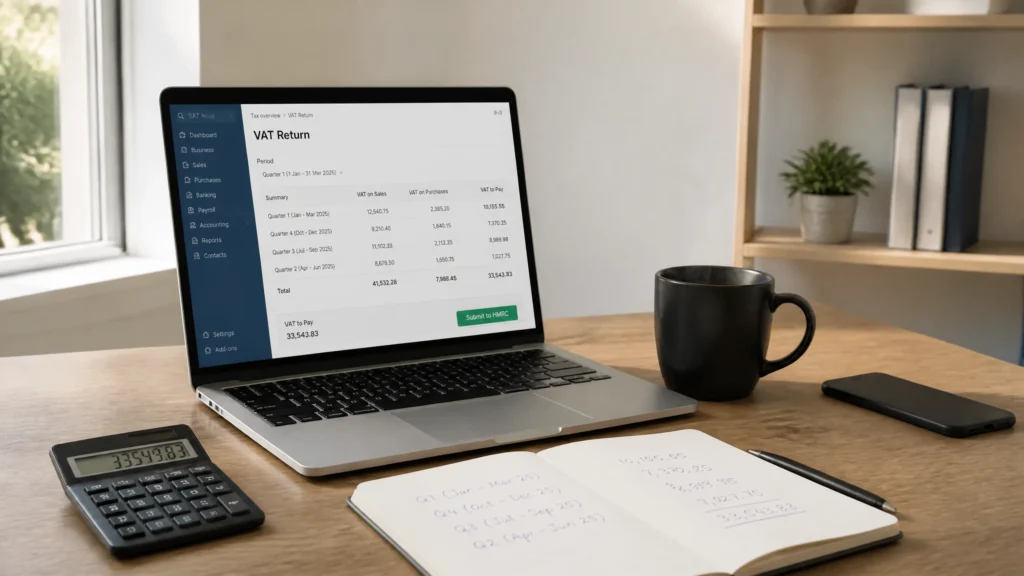
Rates current as at May 2026. Subject to change. Take independent tax advice for your specific circumstances.
Filing a VAT return on Xero is one of the most-asked questions for any UK business newly registered for VAT or newly migrated to Xero from spreadsheets, Sage or QuickBooks. The mechanics are quick once the foundation work is right. The mistakes that cost real money are almost always made before the return is even opened. The walkthrough below covers MTD setup, the HMRC connection, the nine-box review, submission, and payment, plus the edge cases (partial exemption, capital goods, EU and Northern Ireland trade) that the standard Xero help articles tend to gloss over.
The VAT registration threshold rose to £90,000 on 1 April 2024 and remains at that figure as at May 2026. The standard rate is 20 per cent. Making Tax Digital for VAT is mandatory for every VAT-registered business regardless of turnover, with quarterly digital submissions through MTD-compatible software. Xero is on HMRC’s recognised software list.
Before you file: set up MTD in Xero
The first VAT return on Xero is the one most likely to error. The setup steps below take roughly 20 minutes and remove every blocker that causes the “no return found” or “obligation not available” errors that fill the Xero community forum.
- Confirm your VAT scheme in Xero. Go to Accounting then Advanced then Financial settings. Set VAT number, VAT scheme (Standard, Flat Rate, or Cash), and VAT period (monthly, quarterly, or annual). The scheme must match HMRC’s records exactly; mismatches cause submission errors.
- Connect to HMRC. Accounting then Reports then VAT Return. Click Connect to HMRC. You will be redirected to Government Gateway. Sign in with the same credentials your business uses for VAT (not your personal tax account). Grant Xero permission to view VAT obligations and submit returns.
- Pull obligations. Xero will fetch your VAT obligations from HMRC and display the next due period. If nothing appears, you are likely still inside an old non-MTD agent setup at HMRC and need to sign up for MTD at gov.uk before Xero can see your obligations.
- Check the VAT box layout. The nine boxes (1 to 9) should auto-populate from your transactions. Run a VAT Audit report before submission and reconcile each box against your sales and purchase ledger totals.
How to file your VAT return step by step
Once setup is clean, the per-quarter routine is short. Here is the sequence we use every quarter for the Xero clients we look after.
- Reconcile every bank account up to the period end. Any unreconciled transaction is invisible to the VAT return. The Xero VAT return only includes posted, dated transactions in the VAT period.
- Review the Account Transactions report filtered to “No VAT” or “Unassigned VAT”. Any line without a VAT rate is a potential underclaim or overstatement. Fix the VAT code on the original transaction.
- Open the VAT Return in Reports. Xero displays the nine boxes with drill-down. Click into each box and verify the underlying transactions look sensible.
- Run the VAT Audit report. This is the single most useful sense check. It lists every transaction in the period with its VAT rate, net, and VAT amount. Sort by VAT rate and look for outliers (a £45,000 expense coded zero-rated when it should be 20 per cent is the classic catch).
- File with HMRC. Click Save then File with HMRC. You will be asked to confirm declaration. Xero submits via the MTD API and stores the HMRC receipt with the return.
- Pay HMRC. Set up a Direct Debit for VAT (HMRC takes payment three working days after the due date) or pay by Faster Payments using your VRN as the reference.
Worked example: a typical quarterly VAT return on Xero
A four-person Manchester software consultancy on Xero Standard at £33 per month, VAT registered on the standard scheme. The figures below are one full quarter (three months) ending 31 March 2026, run through Xero exactly as we would advise a new client to do it.
| VAT box | Description | Quarter value |
|---|---|---|
| Box 1 | VAT due on sales | £18,600 |
| Box 2 | VAT due on acquisitions from NI | £0 |
| Box 3 | Total VAT due (Box 1 + Box 2) | £18,600 |
| Box 4 | VAT reclaimed on purchases | £3,420 |
| Box 5 | Net VAT payable to HMRC | £15,180 |
| Box 6 | Total sales excluding VAT | £93,000 |
| Box 7 | Total purchases excluding VAT | £17,100 |
| Box 8 | Goods supplied to NI / EU | £0 |
| Box 9 | Goods acquired from NI / EU | £0 |
The whole return, from “open Xero” to “HMRC receipt stored”, took the bookkeeper 42 minutes. Of that, 8 minutes was the actual submission and 34 minutes was the VAT Audit review where two coding errors were caught (a £680 software subscription mis-coded as zero-rated and a £140 train ticket mis-coded with 20 per cent VAT when train fares are zero-rated). Those two fixes alone changed Box 5 by £164.
Filing VAT directly vs via an accountant
Most small businesses we look after start by filing their own returns then move to letting the accountant file as confidence in the books grows. Both routes work; the right choice depends on transaction volume, complexity, and how much time you can give the books each quarter.
| Factor | DIY filing in Xero | Accountant files via Xero |
|---|---|---|
| Quarterly cost | Xero subscription only (£33/month) | £95 to £250 per return typical |
| Time per quarter (owner) | 3 to 6 hours | 1 hour (sign-off only) |
| Catch rate on coding errors | Owner self-review | Trained reviewer plus Xero VAT audit |
| HMRC enquiry support | DIY | Accountant deals direct with HMRC |
| Best fit | Simple businesses, owner-managed | Complex VAT, partial exemption, EU trade |
The honest break-even point for most owner-managed businesses sits around £500,000 of annual turnover or any business with partial exemption, capital goods scheme, or EU and Northern Ireland trade. Below that, a careful owner running clean Xero books can file confidently themselves.
When to call an accountant about your VAT return
- If you have any partial-exemption exposure (exempt and taxable supplies in the same business), the standard Xero VAT return does not handle the calculation. You need the special partial-exemption method agreed with HMRC and a manual override every quarter.
- If you sell goods to Northern Ireland or import goods from the EU, the Postponed VAT Accounting rules apply. The Xero VAT return supports PVA but only if you have flagged each transaction correctly using the right tax rate. Box 1 and Box 4 must reconcile to your monthly PVA statement from HMRC.
- If you operate the Flat Rate Scheme, Xero applies your flat rate percentage automatically but you must confirm the limited-cost-trader test each quarter. Get the test wrong and HMRC will reassess up to four years back.
- If you have bought a capital asset over £2,000 plus VAT, the Capital Goods Scheme may apply and the input VAT can need adjusting over 5 to 10 years. The standard Xero return does not handle this.
- If you have made a coding error you spotted after submission, errors under £10,000 net can be adjusted on the next return. Over £10,000 net needs a VAT652 error notification to HMRC.
Common VAT return edge cases on Xero
- Reverse-charge construction services (CIS). Sub-contractors invoicing main contractors in scope of the domestic reverse charge code their sales as “Reverse Charge”. The customer accounts for the VAT in Box 1 and Box 4. Xero handles this with the dedicated tax rates but you must apply them at invoice creation, not after.
- Import VAT and duty deferment. Goods imported from outside the UK come with import VAT either paid at the border or postponed. Use the “PVA Import 20%” rate in Xero, and tie out monthly against your HMRC Monthly Postponed Import VAT Statement.
- Bad debt relief. You can reclaim VAT on invoices unpaid more than six months after the due date. Post a credit note in Xero with the original VAT date as the reference, coded to Bad Debt Relief, and the Box 4 adjustment flows automatically.
- Mileage claims on personal vehicles. The advisory fuel rate VAT is reclaimable. Xero does not auto-calculate this; you need a separate expenses entry for the deemed VAT element on the fuel portion of the mileage rate.
- Pre-registration VAT. You can reclaim VAT on goods bought up to four years before registration (if still held) and services bought up to six months before. Post these in the first VAT return after registration with the registration date as the tax point.
VAT deadlines and penalties
Filing late or paying late triggers the points-based penalty regime introduced in January 2023. Each late return adds one point; thresholds vary by filing frequency (4 points for quarterly filers, 2 for annual, 5 for monthly). Once the threshold is reached a £200 fixed penalty applies and recurs for each subsequent late return. Late payment also triggers interest charged at Bank of England base rate plus 2.5 per cent.
Your VAT return is due one calendar month and seven days after the period end. So a quarter ending 31 March 2026 is due by 7 May 2026, with Direct Debit collection three working days later. Set the Xero VAT Return as a recurring report so it appears in your “to do” list a fortnight before each deadline.
Frequently Asked Questions
Is Xero MTD compliant for VAT?
Yes. Xero is on HMRC’s published list of MTD-compatible software. Connect Xero to HMRC via the VAT Return screen, grant the permissions, and Xero pulls your obligations and submits returns through the MTD API. Receipts are stored with each return inside Xero.
How long does it take to file a VAT return on Xero?
For a clean Xero file with reconciled bank feeds, 30 to 60 minutes per quarter is typical. Most of that time is the VAT Audit review where coding errors get caught before submission. First-time setup adds 20 minutes for the HMRC connection.
What VAT scheme should I choose in Xero?
The Standard scheme suits most VAT-registered businesses. The Cash scheme defers the VAT point to when invoices are paid (useful if customers pay slowly). The Flat Rate Scheme applies a fixed percentage to gross turnover and suits low-cost-base businesses under £150,000 turnover. Your accountant can model the cash impact of each.
Can I file a VAT return on Xero without an accountant?
Yes. Many owner-managed businesses file their own returns in Xero after a short setup. The Xero VAT Audit report is the single most useful self-check, and the VAT return UI walks you through each box with drill-down. The risk shifts to you for any coding errors so build the habit of running the VAT Audit at the end of every month, not just at quarter-end.
How do I correct a VAT return I have already filed?
For errors under £10,000 net, post the correction in the next VAT return with a journal explaining the adjustment. For errors over £10,000 net (or over 1 per cent of Box 6 turnover, whichever is higher), file a VAT652 error notification to HMRC. Keep evidence of the correction in your Xero attachments.
Why is my VAT return showing zero when I have transactions?
The most common cause is unreconciled bank transactions in the VAT period. The Xero VAT return only includes posted, dated transactions. Reconcile your bank feeds first and the boxes will populate. If still zero, check that each transaction has a VAT rate assigned (not “No VAT” or blank).
Does Xero work for the Flat Rate Scheme?
Yes. Set the scheme to Flat Rate in Financial Settings and enter your sector percentage. Xero calculates the VAT due on each invoice at the flat rate, while still tracking input VAT separately for the limited-cost-trader test. The VAT return Box 1 will show the flat rate applied to gross turnover.
Further reading
- Xero Central: Submit VAT Returns Online
- gov.uk: Making Tax Digital for VAT
- HMRC VAT Notice 700/1: Should I be registered for VAT?
- ICAEW Tax Faculty: VAT
Related Xero guides
- How to Run Payroll with Xero Accounting Software
- Xero Bank Reconciliation Made Simple
- The Ultimate Guide to Migrating From QuickBooks to Xero
- MTD.Digital: Making Tax Digital for VAT specialists
Speak to a Xero VAT specialist
In our experience of looking after a few hundred Xero VAT files across Greater Manchester, the single highest-impact change we recommend for newly VAT-registered businesses is to run the VAT Audit report at the end of every month, not just at quarter-end. We have seen owner-managed Xero files go from monthly coding-error backlogs of 20+ transactions to fewer than 3 inside two reporting cycles using just that discipline. Our position is that bookkeeping habits, not software features, separate a confident in-house VAT filer from one who lives in fear of HMRC enquiry.
If your VAT situation is straightforward, the Xero return is a 45-minute job each quarter and well within reach for an owner-manager. Where it gets harder is partial exemption, capital goods, post-Brexit trade with the EU and Northern Ireland, and any business with revenue moving through £1m a year where the Annual Accounting Scheme starts to be worth modelling.
JacRox is the Xero cloud accounting arm of Jack Ross Chartered Accountants, a Manchester-based ICAEW-regulated chartered firm founded in 1948. We are a Xero Silver Partner and look after VAT for businesses across Greater Manchester and the North West. If you would like a second pair of eyes on your VAT return, or a fixed-fee quote for outsourced VAT filing, speak to our team via our contact page or call us on 0161 832 4451.